
01 / ALWAYS CLOSE
Guest app
Your name and style on iOS and Android. Orders, loyalty points, offers and posts — in your guests’ pockets.
Everything that connects you with your guests.
And everything that helps your team work.
POS, your own ordering channels and in-store displays — connected to your kitchen, inventory and finance.

Your POS, guests and team are connected. From an order on any screen to the kitchen, pickup and reports.
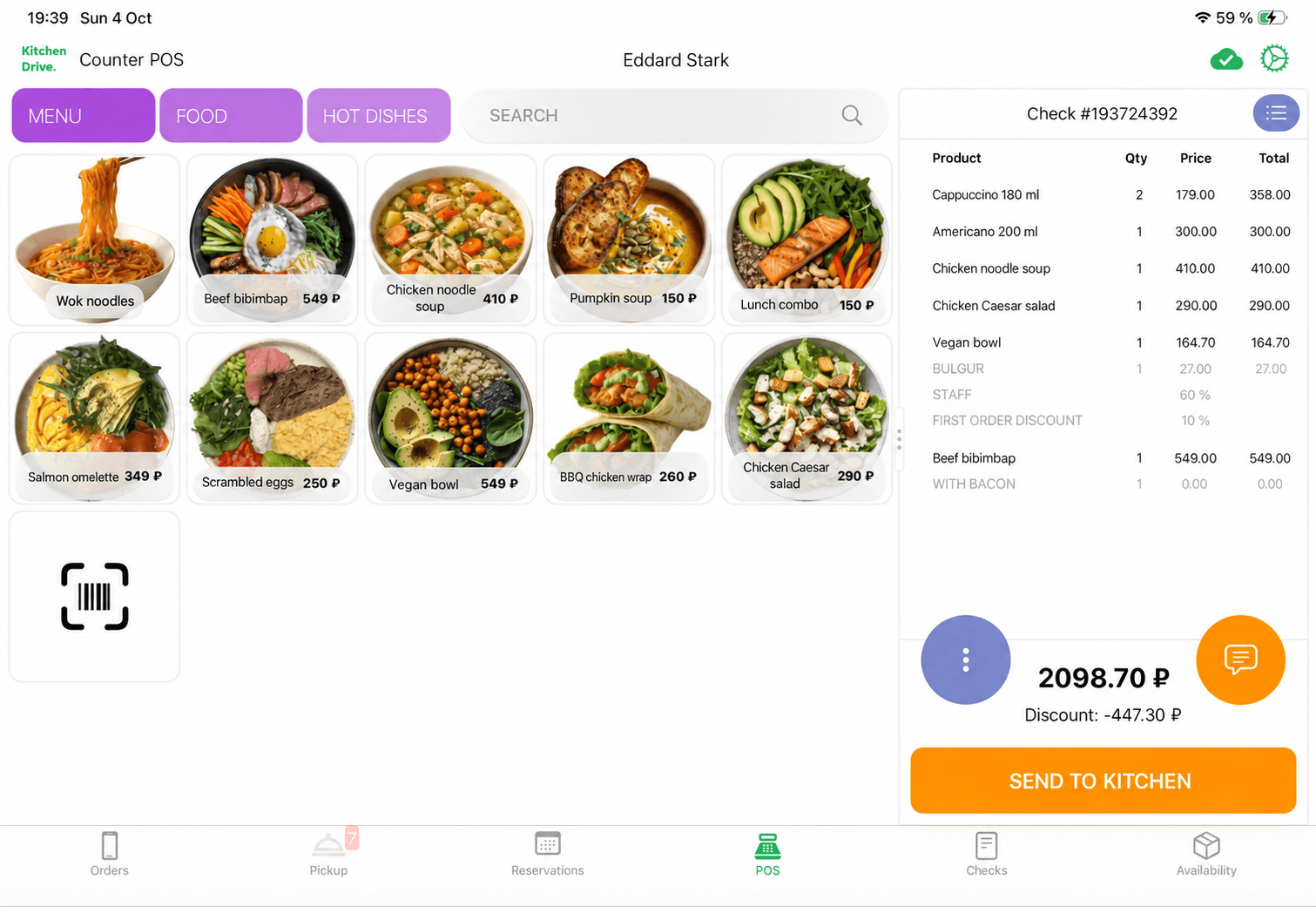
Guests choose how they want to order.
You create a consistent experience — from menu to pickup.
Your name and style on iOS and Android. Orders, loyalty points, offers and posts — in your guests’ pockets.
Menu and online ordering in a browser. Your own sales channel, styled for your venue.

Guests browse the menu and place orders themselves. Your team receives them in the shared system.
Pricing is discussed individually.
Order details and the total in plain sight. Between orders, show your photos and videos.
As an additional terminal — $5/month.
Guests can see which orders are being prepared and which are ready to collect. Clear pickup on a dedicated display.
As an additional terminal — $5/month.
Photos and videos on screens in your venue. Manage content, playback order and devices.
Display your menu on screen — no printing needed.
As an additional terminal — $5/month.
Cappuccino + croissant RUB 430
 Yandex Eats
Set up your menu and separate delivery prices in Kitchen Drive. Yandex Eats and Delivery Club receive them automatically — no need to re-enter the menu or update prices manually in each service.
Products, descriptions and prices are sent to the delivery services.
Orders arrive automatically. Staff do not have to copy items manually.
Create a receipt from an incoming order and continue working in the POS.
Your own channels do more than sell. They help you stay in touch with guests.
Points, personal discounts, promo codes and achievements bring guests back. Send push notifications through your app about offers, new products and reasons to visit again.
Send birthday wishes directly from the guest profile — with a personal message and a gift certificate.
Assign couriers and track preparation and delivery. Set delivery charges for guests and courier compensation.
Help with images, text and documents.
You review and choose the result.
Improve product and category photos: backgrounds, cropping and presentation.
Generate preparation instructions for recipe cards.
“A smooth cappuccino with soft milk foam…”
Sample textGenerate descriptions in product marketing fields — for menus, websites and apps.
AI recognizes the document and matches its rows to your catalog. When recording a delivery, you immediately see the percentage price change since the previous purchase.
| Ingredient | Quantity | Price | Change |
|---|---|---|---|
| checkMilk 3.2%From your catalog | 12 l | RUB 95 Previously RUB 90 | +5.6% |
| checkCoffee beansFrom your catalog | 4 kg | RUB 2,100 Previously RUB 2,000 | +5.0% |
| checkCream 33%From your catalog | 6 l | RUB 400 Previously RUB 420 | -4.8% |
Spot price increases before posting the delivery.Compare the new and previous prices immediately after recognition, and check any changes with your supplier.
One system for the whole team — from frontline staff to the owner. Each role has its own tools.
Incoming payments, outgoing payments and account balances. Planned and actual cash flow, income and expense categories — for one venue or a chain.
Tables and quick orders, modifiers, dish readiness, receipts and shifts. The POS keeps working offline.
Dish costs based on recipes and purchase prices, food cost percentage and trends. See how purchasing affects your menu.
Deliveries, stock levels, inventory counts, transfers and write-offs. See purchase price changes as soon as you add a delivery.
Refunds, risky discounts and loyalty point transactions. Review history shows what happened, when and who performed the operation.
Select several deliveries and send them to the bank for payment with one button. Reconciliation statements, 1C integration and Excel report exports.
Guest analytics and activity, order and receipt archives. Make up for staff errors with points, celebrate birthdays and bring guests back with push campaigns.
Tables, dishes ordered in advance, deposits and reservations linked to the guest’s bill. All the information is available to the team.
Schedules, photo check-ins, checklists and permissions for staff, managers and owners. Keep one venue or a chain organized.
Everything you need out of the box: POS, accounting, equipment and integrations are already connected in Kitchen Drive. No additional POS or accounting system is required.




 EGAISIncluding portion-based accounting
 MercuryAcceptance of incoming veterinary certificates
 Chestny ZNAKProduct marking and traceability
Connect a payment terminal to Kitchen Drive and accept payments directly from the POS, including on biometric terminals.
Complete venue automation
$59per monthOne POS includedChoose PRO north_eastVenue and ordering website
from $78per monthPRO + ordering website includedChoose PRO + website north_eastVenue, ordering website and app
from $127per monthAll includedChoose Full north_eastThe POS and all management tools are included in the base plan. Choose whether to add a guest website and app.
An extra POS, kitchen or order queue display — $5/month per terminal. Kiosk pricing is tailored individually.
Choose a plan and set up access.
Add products and connect devices.
Start working together with your team.
Start with the products you need and add a website, app or displays as required. We will discuss your setup and pricing before you connect.
Yes. Guest-facing products use your venue’s name, logo and visual style.
The POS supports offline operation and synchronizes later. Online orders and external services require a connection.
Start with the POS. Build your ecosystem.
We will help you choose a plan, connect equipment and prepare to launch in one day.
8 (800) 600-41-63mail@support.kitchendrive.online